Features
What are the must-have digital signage software features for businesses?
Essential Digital Signage Features Every Business Needs
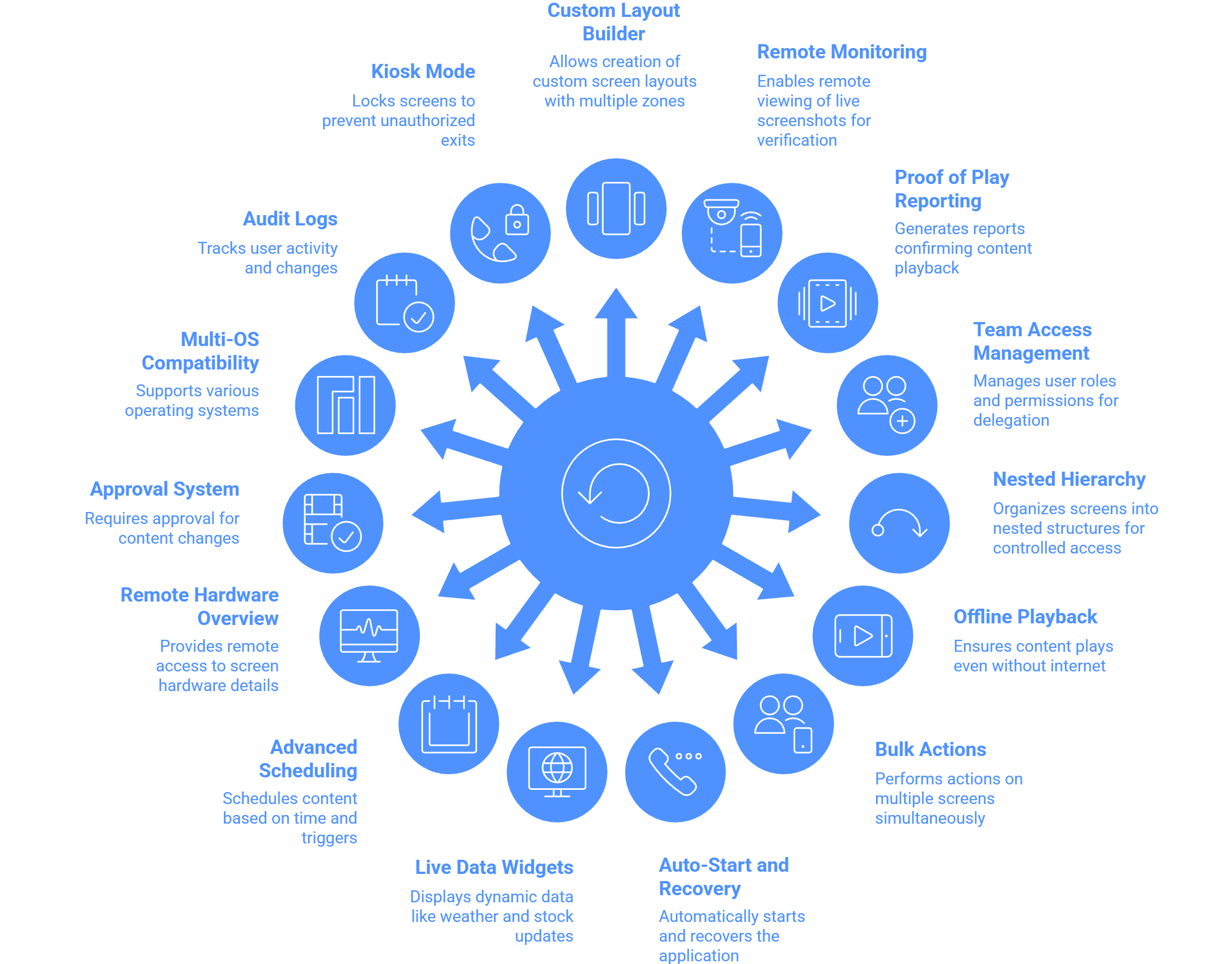
For businesses leveraging digital signage software across multiple locations, the following 15 features ensure reliability, remote control, content flexibility, and organizational accountability.
Here are 15 essential digital signage software features for businesses:
Custom Layout Builder with Zone Flexibility: This tool allows businesses to create custom screen layouts with multiple zones, enabling the simultaneous display of mixed content.
Example: A retail store can use a custom layout to display dynamic advertisements in one zone while simultaneously showing a live stream or engaging video in another zone.
Remote Monitoring and Live Screenshots: The system must allow users to remotely fetch Live Screenshots of the displays for playback verification.
Example: The operations team for the 7amdaan.io DOOH network uses remote screenshots to confirm the status of new ad campaigns in real-time without physically visiting the screens.
Proof of Play Reporting: Generates detailed reports (in Excel or charts) that confirm the playback of content.
Example: A DOOH advertising business like Alan Advertising & Media uses this feature to generate media file playback reports to demonstrate the success and total number of playbacks to clients for accountability.
Team Access Management with Granular Permissions: This allows for the creation of different user roles (viewer, editor, manager, etc.) with specific permissions and assignment to screen groups for delegation.
Example: McGraw Hill: India used this feature (Sub-user Access) to create profiles for admin and operators, ensuring seamless content management and controlling user permissions across the organization.
Groups-in-Group (Nested Hierarchy): Provides the ability to organize screens into nested structures (e.g., Country > State > City) for faster and controlled access.
Example: A large retail chain uses Screen Grouping to ensure that content updates are pushed directly from the group section to only the displays within a specific city or area.
Offline Media Playback: Screens are built to continue to play scheduled content even without an active internet connection, ensuring continuity.
Example: A QSR (Quick Service Restaurant) can guarantee that their digital menu boards will display the full menu continuously, even if the store's internet connection drops.
Bulk-screen Actions: Gives the option to send settings, add playlists, take live screenshots, or restart applications on 100+ screens with a few clicks.
Example: A large corporation managing screens across 350+ cities can use bulk actions to perform a remote application restart on dozens of screens efficiently after a system update.
Auto-Start and Auto-Recovery: The player application must Auto-start at the boot of the device and automatically restart after any malfunctions to maintain continuous performance.
Example: If a display briefly loses power overnight, the signage application will automatically launch and run the content 24/7 in a loop as soon as the display starts up, requiring no manual intervention.
Live Data Widgets (Enterprise Use): Offers widgets for dynamic data rendering, including Webpage, Power BI, Google Slides, and PDF. It also includes feeds like Weather, AQI, and YouTube.
Example: A bank utilizes a Webpage Widget or Power BI to display real-time stock market data or promotional rates alongside queue management information.
Advanced Scheduling Features: Includes scheduling based on single file time conditions, playlists, and layouts, allowing for Trigger-based Schedule or Display Time Conditions-based Repeating Schedules.
Example: A business can automate content to display a "Welcome Msg Trigger on New Sales or New Welcome Msg to new customers" based on a specific event trigger.
Remote Hardware Details Overview: Allows managers to view crucial screen data remotely, such as RAM (In Use / Total), Storage, IP, MAC, Model, and Network Signal Strength.
Example: An IT administrator can remotely check the Network Signal Strength of an outdoor digital billboard to determine if connectivity issues are causing content delays.
Maker and Checker Approval System: Implements a workflow where content changes or deployments by sub-users require manager approval before going live.
Example: Large retail businesses use this system to ensure that new advertising campaigns or sensitive promotional content are reviewed by a manager to avoid unauthorized or costly errors before deployment.
Multi-OS Compatibility: The software must be compatible across diverse hardware and operating systems, including Windows, Linux, Android, and SoC Devices (LG WebOS, Samsung Tizen).
Example: TacoBell Malaysia used this feature to achieve a unified management system for their digital menu boards despite having multiple brands of commercial displays in use.
Audit Logs: The system captures all user activity history and logs each action with a timestamp.
Example: This allows management to monitor and track the reliability of screen updates and understand which user took which action when troubleshooting unexpected content changes.
Single Purpose Application Mode (Kiosk Mode): Locks Android and Windows screens to the signage application, preventing unauthorized app exits.
Example: Used when deploying an interactive kiosk solution for self-ordering or feedback to guarantee the public cannot accidentally exit the application or access device settings.

Multi-Platform Compatibility for Every Digital Signage Display
Run Wilyer’s digital signage software on your preferred operating system with zero hassle.