

The cost of installing digital signage depends on several factors, such as your country, the type of display, the installation location, and the level of professional help you choose. Digital signage is not just about buying a screen; it includes hardware, software, and installation labor.
Let’s break it down:
- Hardware: The most basic part of any signage setup is the display. A standard 43-inch TV typically costs between $1000 to $1200 if you go for a commercial-grade model from brands like Samsung, LG, or Panasonic. However, if you are using a local TV brand, you can reduce the cost to around $500 to $800 .
- Software: The software governs what appears on your screen. A cloud-based solution costs approximately $120 to $150 per screen per year. On-premise software costs about $1500 upfront (server cost) and $500 to $700 per screen per year for the license.
- Installation and Mounting: You will want to use a professional to make sure the screens are properly mounted and all components are configured in the proper manner. Installation can cost between $100 and $200 per screen for labor and mounts, depending on the installation requirements. For a clearer breakdown of ongoing expenses, especially around cloud vs on-premise models, check our guide on digital signage software pricing and licensing .
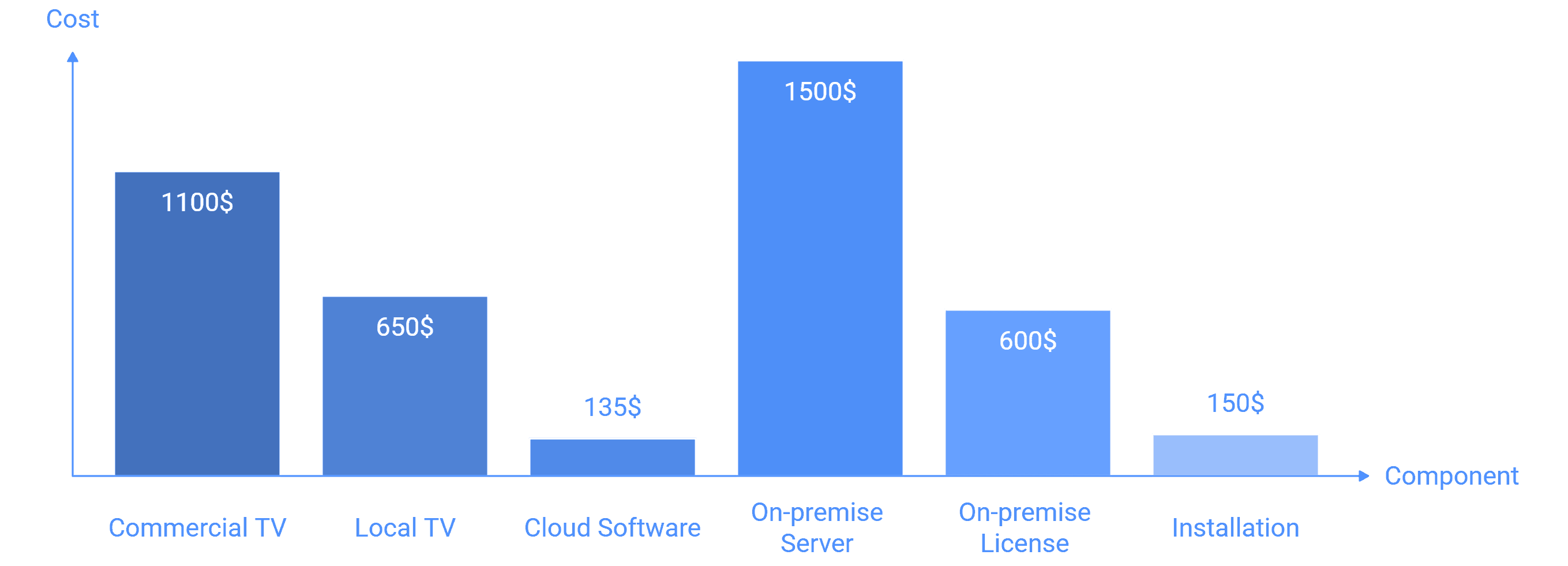
In summary, installing digital signage for a small restaurant or retail space can cost anywhere from $1500 to $2500 per screen as an initial investment. This can increase dramatically if you are installing large outdoor LEDs or need more sophisticated multi-screen systems due to weatherproof configurations and structural support.


