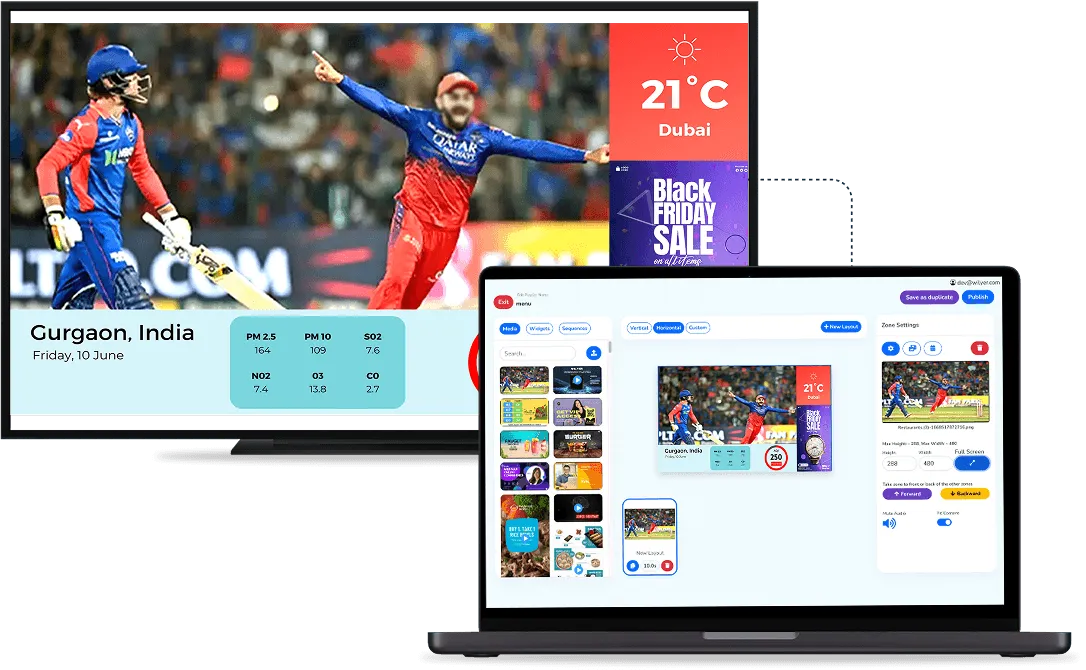
The token display is the screen people look at most while they wait, so what it shows decides whether a waiting area feels organised or chaotic. A good one answers the two questions every visitor has, "how many are ahead of me?" and "is it my turn yet?", without anyone walking up to the counter to ask. For how tokens are issued and called in the first place, see what a queue management system is.
What Does the Queue Side of the Screen Show?
The queue side is laid out so it reads at a glance from a seat:
- Waiting: the token numbers still in the queue.
- Being served: the numbers currently at a counter, in a room or at a table.
- The token being called: when staff call the next number, it moves from waiting to calling and flashes, and the same number is announced aloud with the counter or room to go to.

The list refreshes live as tokens are called, completed or skipped, so a visitor can count how many people are ahead of them without asking anyone. That one change takes a steady stream of "how long now?" questions off the front desk.
What Can the Rest of the Screen Show?
A waiting area usually needs more than numbers, and a token display system can show queue tokens and other content on the same screen. Typical content for the other half:
- Weather
- Headlines
- A scrolling notice, such as timings or a change in procedure
- In a restaurant, the menu and current offers
This works because the queue display and the digital signage run as one connected system, managed from the same dashboard. You do not need one screen for the queue and a second screen, with its own wiring, for everything else. People sitting with nothing to look at feel every minute of the wait, and something worth reading beside their own number makes the same wait easier to sit through.
A clinic showing health notices and a restaurant showing its menu are using the same split for different jobs, so decide what the room needs before you fill the space.
How Is the Token Display Set Up?
The token display is created in the queue dashboard, where you choose from several themes and templates for the waiting-area screen. Displays are set up per space, such as a department or a floor, alongside that space's counters. You can use displays you already own or buy new ones.
What Should You Check Before You Install It?
- Screen size and distance: a split screen leaves less room for the numbers, so make sure the token side is readable from the back row.
- Who updates the content: weather and headlines look after themselves, but notices and offers need an owner who keeps them current.
- Small rooms: if the waiting area is small and the numbers are all anyone looks at, a full-screen queue board may be the cleaner choice.
For the complete setup, from check-in to calling, see our queue management system, or book a live demo to check it against your own queue.